Windows Home Server Console is missing Computers & Backup tab

Initially, I only had the intermittent problem of being unable to connect to my HP MediaSmart server - running Windows Home Server - using the console. Since the automatic backups worked OK and I can still connect with Terminal Services, I didn't think too much of it.
Since I planned on backing up my server manually to a USB drive attached to the server (since automatic server backup is unfortunately not possible) I started the console by double-clicking the tray icon. I was greeted with the following error:
Windows Home Server Console
The Windows Home Server Console cannot open because the following file is blocking it: HomeServerConsoleTab.Health.dll.
Do you want to open the Console without this file?
If you click Yes, the Console may start without a feature that is associated with this file. If you click No, the Console will try to open again, using this file.
I answered with Yes and the Windows Home Server Console opened. However, the Computers & Backup tab was missing:
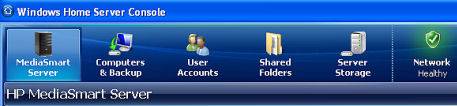
The typical console, with the C&B tab.

The console, now without the C&B tab.
As I later discovered, a new feature was introduced in Power Pack 1, where problems with tabs are being detected each time the console is reloaded. See Blocked Tabs (June 9, 2008). No idea why this intermittently would cause a problem.
The folder C:\Documents and Settings\All Users\Application Data\Microsoft\Windows Home Server\logs contains log files and some of these seem to point to errors that occurred prior to me starting the console but I have yet to come to a conclusion as to the cause.
A quick search on the HP customer care site results in nothing useful.
I reinstalled the console software on the workstation from the software share on the MediaSmart server but this had no effect. After I rebooted the server (this server seems to be in need of reboots frequently, not a good sign for a server in my books) and after I had cycled the Windows Home Server Connector Service on the workstation numerous times, I was finally able to bring the console up with the Computers & Backup tab so I could start the server backup.
Again, this is on a plain vanilla HP MediaSmart server with only the critical Microsoft security updates, and Home Server Power Pack 1 installed. I have not installed any add-on nonsense and I certainly do not experiment with this server at all, it simply houses all my files and backups. The Windows XP Pro workstation with the console is also a plain vanilla installation.
I am beginning to believe that I would have better spent my money on a NAS solution with automatic backups, running Linux. If these problems persist, I am beginning to believe that either the HP hardware or the Microsoft "home server" concept is highly unreliable, despite some raving reviews (like this one, makes me distrust reviews). I can't be the only one having problems with this device.
Edit December 21, 2008: Added link regarding blocked tabs.
Comments
very frustrating!!
totaly unhappy with the HP Home Server
If you are using third party add-ins, you may want to try uninstalling these and see if it resolves the problem.
The supported way of resolving this is a server recovery, using the Server Recovery DVD that came with the unit. This process restores the server without touching the data. If you go that route, be sure to read the HP instructions.
Just for your information :
I had the same problem for a couple of days but with the HomeServerConsoleTab.Sharing.dll. What I did is log in with remote desktop connection, rename the file located in \Program Files\Microsoft Home Server\ load the console (it loaded fine without warning for HomeServerConsoleTab.Sharing.dll). After that I rename the file to it's original name and now it's working again. Maybe it's pure luck, but if it can help someone, well i'm glad i replied.
Have a nice day!
Haven't seen that solution yet. Thanks for sharing!
Brilliant! worked like a charm! Thanks!
It worked for me, Thanks!
Thank you so much; worked beautifully!
Perfect. Thanks! Worked for me!
Same issue with the "Computers & Backups" tab. I'm in for a complete fresh reinstall this weekend. Disappointed because of this issue. Would be a nice tool otherwise ..
I have not sound any reliable solution at all. Like you, we cannot be the only ones.
Did this solution work for you? It did not for me ..
May sound vague but I am not certain what exactly fixed my issue. I wasn't aware of the solution posted earlier. Back then, my MediaSmart server was pretty much out of the box (hardware/software) so there were no add-ins to uninstall etc.
I tried both answering the question in the dialog box with Yes and No but it made no difference for me. I uninstalled and reinstalled the connector software several times and rebooted the server in between as well and after a few tries the Computers & Backups tab showed up again but I cannot explain logically why because other than the re-installs and reboots, nothing had really changed. I know, this doesn't sound very helpful.
If you google around a bit you will find people even resorting to a server recovery. This will basically reinstall the operating system but in the process you will lose your computer backups, plus you will need to re-create the users.
If you have added any add-ins recently before this problem started you could try removing those to see if it makes a difference. I tried removing and re-installing the connector software but I am not sure this is a client issue, it seems more of a problem on the server.
If all else fails and you resort to a server recovery, you should be aware that this will wipe out all previous backups (you can try the BDBB add-in to copy the backup database off the server). Plus you will need to manually re-create user accounts after the recovery.
I had the same issue with the computers & backups tab missing. When the error occurs a reg key is created that causes the console to skip loading the computers & backups dll file. Simply remote into the Home Server and check for a key in the following location of the Server's registry.
HKEY_LOCAL_MACHINE\SOFTWARE\Microsoft\Windows Home Server\HomeServerConsole\BlockedDllList
If it's there, just delete the key and reboot the server. The tab should be back the next time you fire up the Home Server Console.
Remember, poking around the registry can cause issues so always create a backup of your registry first.
Interesting. I see the key is there, it's just not populated normally. Thanks for the tip!
Wow!!!!! Thanks Helg.... It worked for me... Thank you soooooo Much it save me so much time. If you are missing the Computers & Backup tab in the Console just follow Helg instructions.. I am reposting them below....Thank you again for spending your time posting.
computers & backups tab missing. When the error occurs a reg key is created that causes the console to skip loading the computers & backups dll file. Simply remote into the Home Server and check for a key in the following location of the Server's registry.
HKEY_LOCAL_MACHINE\SOFTWARE\Microsoft\Windows Home Server\HomeServerConsole\BlockedDllList
If it's there, just delete the key and reboot the server. The tab should be back the next time you fire up the Home Server Console.
Remember, poking around the registry can cause issues so always create a backup of your registry first